
What is Explore Everywhere?
It’s the feature that flips the usual search on its head — instead of choosing a destination, you just type ‘Everywhere’. We’ll show you all the places you can fly to from your chosen airport, sorted by price so you can spot the deals fast.
Built for the flexible, the curious, and the “I just need to get away” crowd, it’s perfect when you’re open‑minded about where you’ll go. Maybe you just know you’ve got a week free in June, or you’re chasing the best deal and happy to let the destination surprise you.

How do I use Explore Everywhere?
Easy! Simply head to the Skyscanner homepage, or the Skyscanner app and follow these steps:
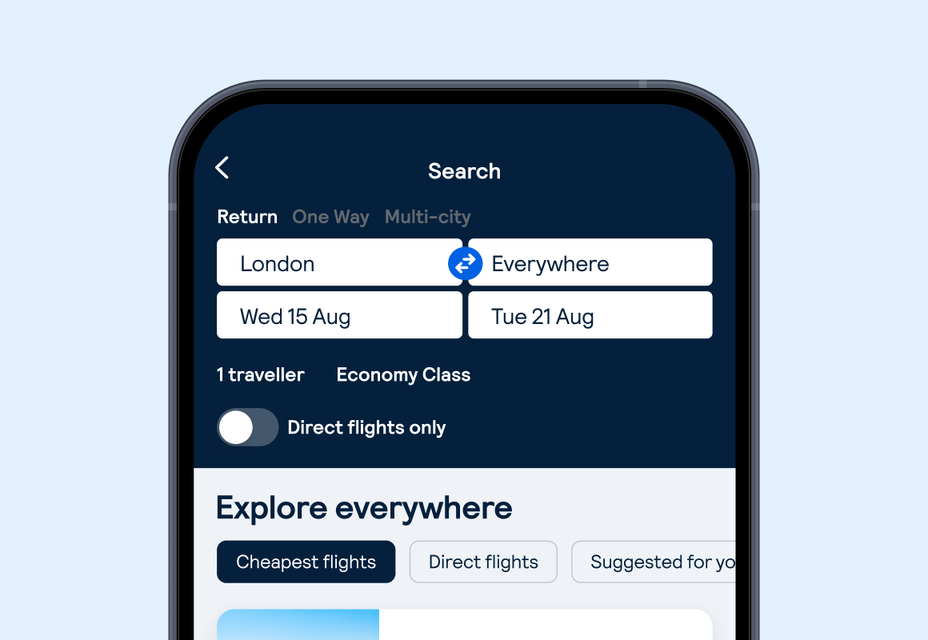
Step 1: Pick your starting point, and choose to go ‘Everywhere’
On the Flights tab, enter your departure city or airport. Then instead of a specific destination, pick ‘Everywhere’ or ‘Anywhere’.

Step 2: Choose your dates
Pick exact dates, a specific month, or ‘Cheapest month’ if you’re feeling flexible.

Step 3: Browse, filter and choose your destination
Results will list destinations by price (cheapest first!). Once you spot a destination you like, you can apply filters (direct flights only, certain airlines, cabin class, number of stops, region) and then click through to book.
FAQs
Flexible on dates and destination? Try ‘Cheapest month’ or ‘Whole month’ — you might spot a deal to somewhere you weren’t even considering.